
Waiting for the Falling Star - Preparing for a Quick Start in Diablo III (updated about the client, beta, and keys. And once again about the keys)
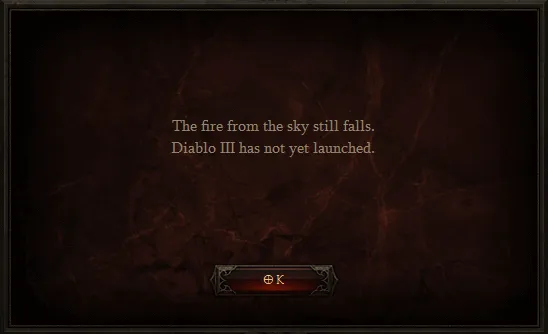
If you plan to start the game before everyone else or during the first wave, you definitely need to prepare for it. And the preparation doesn’t end with "get some sleep and download the client"; you’re looking to be the first, right?
Client Installation
Let's assume you've already purchased the game and created a battle.net account.
We will be unlocking the game's installer at 8:01 a.m. PDT on May 14.
You can download the client today from this link (or the version for Mac), however, installation will only be possible at 8:01 a.m. PDT on May 14, which is 7:01 p.m. MSK on May 14. After installation, the client will additionally download a patch to version 1.0.1 from the servers and install it automatically. However, at this stage, many players may encounter problems. Some may lack disk space, some may have incorrectly configured firewalls, others may have the wrong drivers, and so on.

Let's discuss the main issues of the first stage of preparation:
1) The installer doesn't start/hangs at a certain %/crashes
This issue is observed on Win7 and appeared around the 16th beta patch. I don’t know what Blizzard is thinking, but it’s puzzling many. To solve this, most often it is enough to find the *.exe files in the installer folder and check the properties in the "Compatibility" tab with two checkboxes - run as administrator and (most importantly) enable compatibility with WinXP SP3. Without the latter, it doesn’t work at all for me, nor did the beta. If this operation did not help, check the contents of C:\\ProgramData\Battle.net\ as well - sometimes issues start from there.
UPD:
Sometimes replacing the file at "C:\ProgramData\Battle.net\Agent\Agent.db" for Windows 7 and "C:\Documents and Settings\All Users\Application Data\Blizzard Entertainment\Battle.net\Agent\Agent.db" for Windows XP helps, and sometimes deleting the folder C:\ProgramData\Battle.net\ (don't forget to kill the process agent.exe in the task manager). Overall, it's better to start with the checkboxes, but anything can happen.
In addition, note that the file updater takes not the active internet connection, but the first from the list of available ones, so if you have more than one, the problem may lie there. Also, various proxies won't help, especially if configured incorrectly.
2) I don't know what a Battle Tag is
Learn more and choose one for yourself. You can do this today.
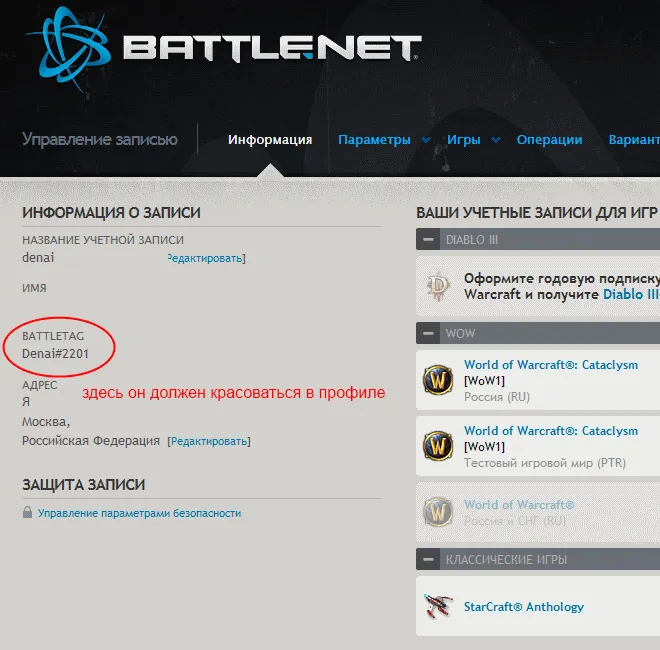
Without it, you won't be able to play.
3) Is everything okay with the other software?
Make sure you have:
Microsoft Visual C++ 2010 Redistributable Package (x86, x64)
And the latest drivers for everything.
However, if you are using the ATI's Catalyst 12.4 drivers, you must roll them back to an earlier version. 12.4 is not supported in Diablo 3. You can roll them back at any time (x86, x64)
UPD:
We've recently become aware that playing Diablo III with the latest Catalyst 12.4 drivers for ATI cards may cause some visual artifacts for specific hardware configurations. This issue affects users of ATI Radeon HD 2400, 2600, 2900, 3400, 3600, and 4500 graphics cards under Windows Vista and Windows 7. ATI Radeon HD 4600, 4700, 4800, 5000, 6000, and 7000 series products are unaffected, as is Windows XP.
Thus speaks the blue post. Make your own conclusions.
UPD2:
A fix for the drivers has been released, and rolling back is no longer necessary.
4) My Windows username is in Cyrillic letters, will that be okay?
No, it won’t be okay. It’s better to rename/recreate. Major issues are related to taking screenshots, but you never know what else might pop up in the process. Other games also don’t always like to see an unfamiliar alphabet in their file paths.
UPD: How to do this?
Old profile name - Old_User, new profile name - New_User. Create a new user with that name (New_User is an example, come up with a name yourself).
Create a temporary user with full rights and the name Temp_User (the name doesn’t matter, the main thing is full rights).
Log in as Temp_User and go to the User Profiles section in the control panel:
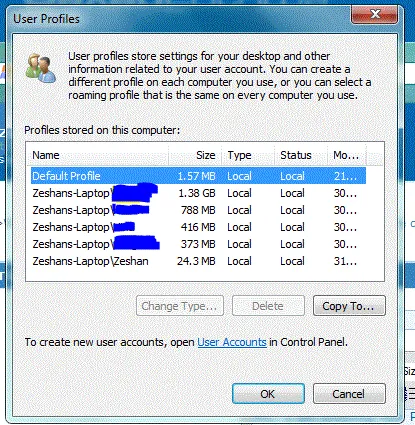
Copy the profile Old_User to New_User (the additional user is needed to copy everything, otherwise it won't work).
Log in as New_User and delete the users Old_User and Temp_User along with their profiles.
Everything good and bad except for the username and paths should remain.
5) I have a lot of questions about the game and more!
You can find answers to them on the official website, on Horadric, and in the game blog.
Launching the Client
Immediately after installation, you won't be able to play. You will have to wait for the server launch. It will take place at 2:01 a.m. on the night of May 14 to May 15, if I’m not mistaken (the Russian version will start later, on the same servers, the difference is only in language and date), so you will have to wait for this time. Naturally, players will rush to the servers, causing queues to form. If you sit in the queue long enough (40 seconds?), you will get Error 37. It's nothing serious; you're just not the only one wanting to play. If it’s a different error, I strongly recommend looking for its solution on the support site, if it doesn’t resolve on its own.
Other issues? Do you wish to talk about it?
Feel free to comment; this post was written for that.
UPD on Client
Attention! If you downloaded the client before 12:00 MSK on May 12, you need to re-download it as it was not complete. Download the updated installer and instruct it to download to the same folder. It will download 50 MB.
UPD on Beta:
If you had the Diablo III Beta client installed and want to install Diablo III, please make sure you deleted all beta client files before installing the full version of the game.
This includes deleting the Battle.net folder located here:
[WINDOWS XP]
C:\Documents and Settings\All Users\Application Data\Battle.net
[WINDOWS VISTA/7]
C:\ProgramData\Battle.net
MAC
/Users/Shared/Battle.net
UPD on Keys:
If you purchased keys not on the official website, do not activate them until the official game launch.
This is a requirement from Blizzard Entertainment for all keys sold outside the official website. It was announced literally days ago.
Earlier activations may get blocked. Why? No idea.
In any case, you won’t lose much time if at the time of release instead of clicking the login button for a few seconds you spend time in your account on the website.
UPD2 on Keys:

UPD not to be sad after the game starts:
Make sure your game settings are correct. Otherwise, you will be sad later. First of all, your game region must be set correctly. There are only 3 - Euro (our region) and two foreign ones. In foreign regions, you won't be able to enjoy some auction benefits for real money, and you can't play with friends who picked the right region either. Characters will remain in place when changing regions and will not move to the new region; the same applies to inventory items. Don’t confuse regions - avoid embarrassment.
Additionally, go into the graphics settings and find the FPS limit. There are 2 sliders - FPS for the active window and the same for minimized. These options determine how your hardware will try to do its job. Visually, you might not notice the difference between 60 and 999 FPS, but the computer will heat up, etc. In the beta, I personally set the limit to 30 for the active window and 4 for minimized; I didn’t notice overheating. A friend of mine was very upset that his computer heats up, found the setting, and suddenly became much happier. Be happy yourself, right from the start.
UPD last:
You can install the game now; moreover, you can already set the Russian language in the settings and thus download the Russian language package, and it’s quite likely that you can play in Russian. Keys can be activated anytime if you already have them, as stated in the blue post on the official forum.