
How to Enable WH in CS2
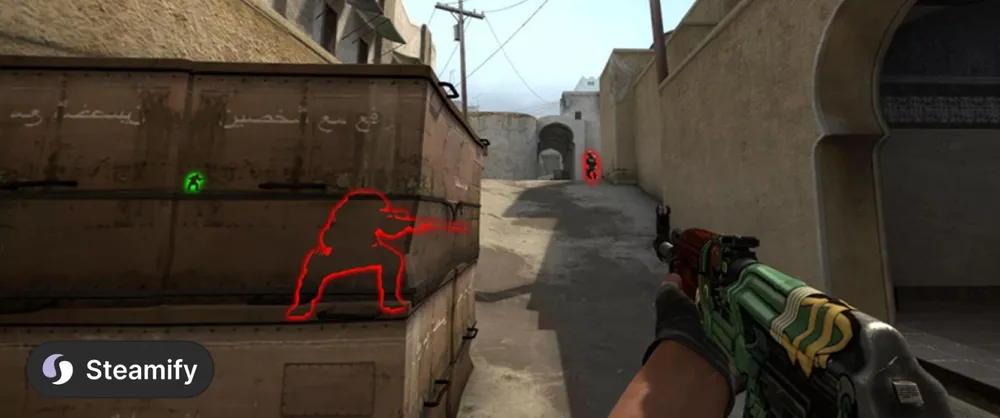
Gamers often look for ways to gain an advantage in Counter-Strike 2, including the use of Wh (Wallhack). This tool allows you to see opponents through walls, predict their actions, and control the game field. Valve developers are actively blocking cheating methods, but we have a guide on VX in CS2
The History of WH in Counter-Strike
How cheats worked before
In previous versions of the game, such as CS:GO or CS 1.6, activating VX was done using console commands:
sv_cheats 1 — activating cheats on a local server;
r_drawothermodels 2 — highlighting player models.
In CS:Source, glow 1/0 was combined with other settings to highlight enemies. However, in CS2, these methods no longer work — the Source 2 engine and the VAC (Valve Anti-Cheat) system block any interference attempts.
Why WH Cannot Be Enabled via Console in CS2
Developers have completely removed cheating commands from the game. Even temporary loopholes, such as cl_physics_highlight_active 5 or draw_simulating_entities, are closed within a day of discovery. Here are the main reasons:
Enhanced VAC protection — the system instantly detects third-party software.
Lack of access to configuration files — settings related to cheats are blocked.
Automatic updates — patches are released daily to eliminate vulnerabilities.
Alternative Methods and Their Risks
Some players attempt to use:
External programs — paid or free cheats with radar hacks and aimbots.
Exploiting bugs — for example, the split-screen mode bug that temporarily made walls transparent.
However, such methods almost certainly lead to a permanent ban. Moreover, cheating applications often contain malicious code. If you want to keep your account and skins, we recommend avoiding such experiments.
Where WH is Officially Allowed
So how to enable WH in CS GO? The only legal way to "peek" at opponents is through the demo mode. Here, the command spec_show_xray 1 is available, which enables wall transparency when watching replays. To download a demo:
1. Launch CS2 through Steam.
2. In the "Statistics" section → "Scrimmage Matches," select the desired match.
3. Click "Download GOTV Replay."
Demos are stored for a limited time, so don't delay strategy analysis. For convenience, use the console command playdemo [filename].
Conclusion: Play Fair and Earn
Searching for WH settings in CS2 is largely a waste of time. Instead, it's better to focus on improving skills: studying maps, adjusting sound, and practicing in Deathmatch mode.
By the way, you can legally sell unnecessary items from your inventory on the Steamify platform — it's safe and profitable.