
Template: Game Card. Specially for Gamer.ru
Once upon a time, on the eve of another KBNiVT, Pegas and I were working on game reviews (link number one, number two, and number three). Although, to be honest, he was mostly working while I was lazily replying on Skype. The most I managed to do was draw game cards in Photoshop. Like this one:
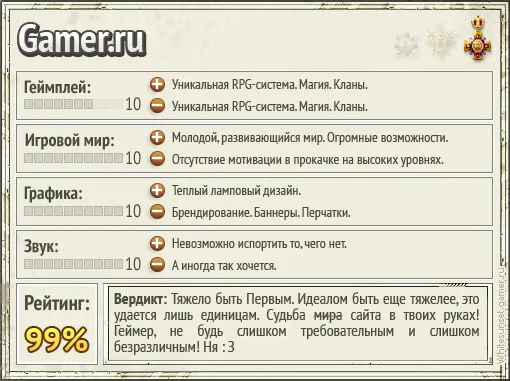
And then, after some time, it was decided to release a FREE Version for free use.
This is a PSD template that you can edit in Photoshop. Minimal knowledge is required. All layers are carefully organized into their folders:
● Game Title
● Orders
● Gameplay
● Game World
● Graphics
● Sound
● Verdict
● Background
Let’s go step by step:
Game Title — the very first layer. Double-click, enter your own.
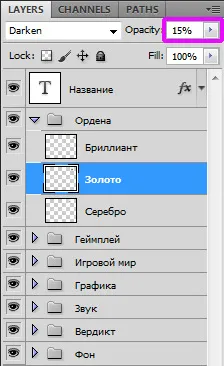
Next come the Orders. In the folder, there are three layers, one for each medal. Leave one layer untouched; the other two need to have their opacity set to ~15%. In this window:
Next, there are four similar blocks: Gameplay, Game World, Graphics, and Sound. Each folder contains the same set of layers. You will need:
● A text layer with a number — change 10 to your own value.
● A graphic layer with the number of squares — open the subfolder "Rating", there are ten ready-made templates, rated from 1 to 10. Make one visible, hide the others.
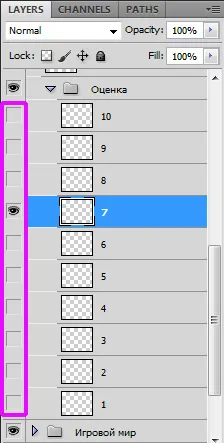
The eye icon next to the layer indicates that the layer is visible. Just click where necessary to toggle the state.
● Text layers with the labels "minuses" and "pluses" — this is the description of the minuses and pluses of each parameter.
Then comes the Verdict. It's simple here too. Write your text, change the rating.
The image size is 510*381. It fits perfectly in width but is fixed in height. So you can't write texts that are too long (Short is the sister of talent!). If you feel like tinkering with the Background layers — you can make the card larger. Just remember that on GRU, images that exceed 512 pixels on one side are automatically resized.
Well, if you are familiar with Photoshop, you probably don't need these explanations =] Have a great week, everyone!