
[Update from 08.04.10] Awaiting the Gamer.ru update — TF2 style for the entire site
Once upon a harsh summer time…
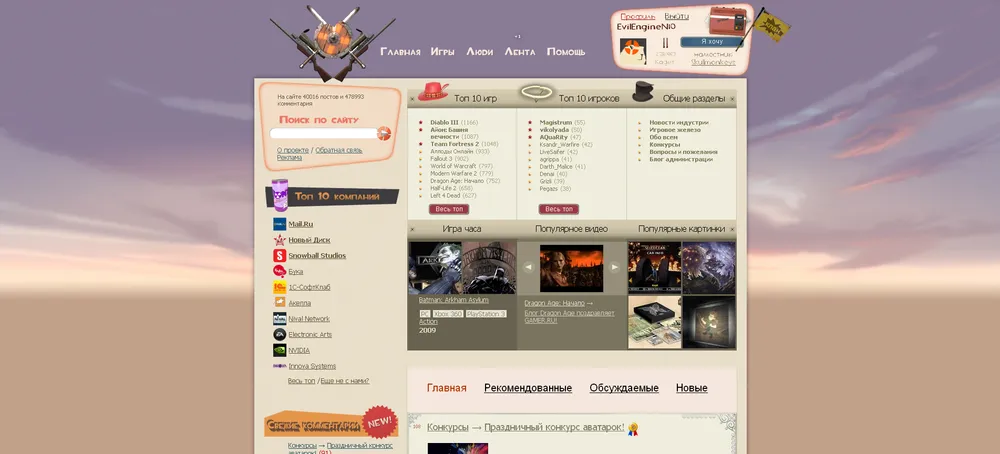
The first idea came to my mind, and then Mr_Moxnat quickly got fired up, and we spent a month at night (well, there was a session, and we had little time) opening Gamer's source files and sifting through each individual element in pursuit of perfection. In the end, we got tired and posted the entire code, yes.
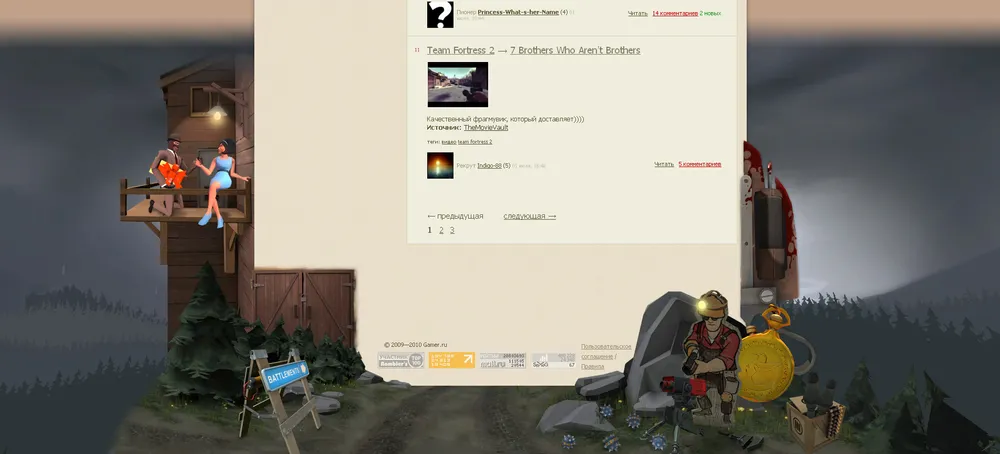
Fixes
— The number of pluses above the top plus was moved down, and now it displays correctly.
— The "favorites" button has been moved to the right.
— The code has become 14% kinder.
To better display the text in the player's card, this font was used. You don't need to install it, but it won't look as nice.
Instructions for Firefox
1. Download Stylish.
2. Go to the page via this link.
3. Install the style by clicking the "Install with Stylish" button.
Instructions for Opera
1. Go to the main page of Gamer.
2. Right-click on an empty area.
3. Download this style file, which is slightly different from the usual one.
4. Replace www.gamer.ru at the top with gamer.ru — this will apply the style truly to the whole site, thanks for this tip iXtremeFROST.
5. Settings for the site 〉〉 View 〉〉 My styles (that same css file).
6. Click Ok and then F5.
Instructions for Chrome
1. Go to the page via this link.
2. Click "Install as user script".
3. Click "Confirm" at the bottom left (or wherever they ask you).
The style is created with modern monitor widths in mind, so everyone will be pleased.
All suggestions for improvement are only accepted in the form of ready code, or we will be like buée-booée.
For those who just want to take a look at the code, you can click the "show code" button via the theme link.
A special thank you to Moxnat can be given by upvoting this post :)
Initially, there was a desire to collect 7 pluses to reach diamond, and now… But no one is complaining **:**D